Anmol Lipi Keyboard
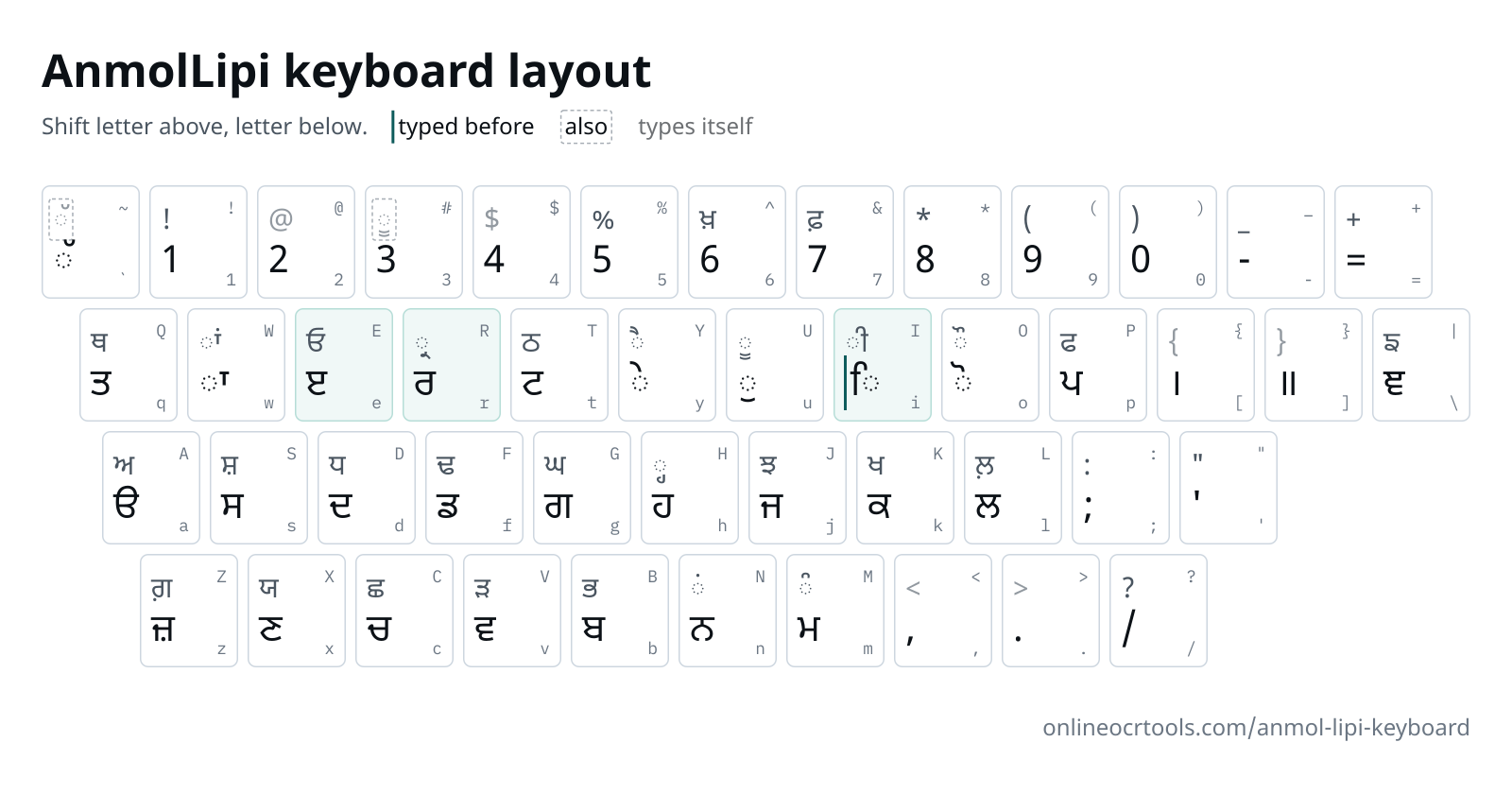
This Anmol Lipi keyboard chart maps all 47 keys to Gurmukhi, with each Shift letter drawn above the plain one. AnmolLipi is a phonetic Punjabi keyboard layout, so k is ਕ and K is ਖ. Type a word such as pMjwbI, and the practice box shows ਪੰਜਾਬੀ as you go.
AnmolLipi keyboard
Each key shows its letter, and its Shift letter above it.
typed before the letter it sits onalso works on this key, as in older filestypes itself (no letter on this key)
Use a computer keyboard for practice. Phone keyboards put the Gurmukhi letters in their own places, not where AnmolLipi has them.
Start typing on your keyboard, or click the keys. Each key lights up on the chart as you press it.
What we accept
What goes in and out
Text in
Paste or type
AnmolLipi text
Text out
Copy
Unicode text
Where it runs
Conversion
In your browser
Your text
Not uploaded
Why people use this tool
Made for Punjabi typing-test practice, and for anyone hunting the key for ਙ, ਞ or ਖ਼.
Plain and Shift on one chart
Every key shows its Shift letter too, so one picture covers the whole layout.
Sihari typed first
AnmolLipi takes ਿ before its letter, as the font draws it. The chart marks that key, and a callout gives an example word.
Punjabi as you type
The practice box turns each key into Gurmukhi as you press it. Press a wrong key and the wrong letter appears, so mistakes are easy to spot.
Stays in your browser
The conversion runs on your device. Your text is not uploaded to our server.
How to type in Anmol Lipi
Four steps, all of them in your browser. Nothing to install and no account.
Look up a letter.
Find it on the chart. If you use a screen reader, the key table lower down the page lists the same keys.
Learn the three keys that differ.
Type i before a letter for ਿ, R or H after a letter for a small ਰ or ਹ under it, and e as the base for ਇ, ਈ and ਏ.
Practise in the box.
Type siq sRI Akwl and watch ਸਤਿ ਸ੍ਰੀ ਅਕਾਲ build up key by key.
Check the dotted letters.
ਸ਼, ਖ਼, ਜ਼ and the addak each get a row in the tricky letters table, with their keys.
What's kept, and what to check
The text comes across as it was typed. A few things are worth a look before you use it.
What's kept
What the box does with your keys
Every key.
Keys are always read as AnmolLipi, so "is" gives ਸਿ, not the English word.
Line breaks.
Enter starts a new line, so you can copy out a passage line by line.
Check before use
Worth checking first
Your exam's layout.
Your exam notice says which font and layout it wants. Try a few of its keys against this chart before you practise.
Phone keyboards.
Letters sit elsewhere on a phone, and autocorrect changes words. Use a desk or laptop keyboard for practice.
Letters on the chart are drawn in Noto Sans Gurmukhi, a Unicode font. You don't need AnmolLipi installed to use this page, and it is not supplied here.
Keys that work differently
- i◌ਿ
Sihari comes first
Type
ibefore the letter, as the font draws it.ikgives ਕਿ. - R◌੍ਰ
Pairin letters go after
Rputs a small ਰ under the letter before it, andHa small ਹ. Type them before the vowel sign:sRIgives ਸ੍ਰੀ. - eੲ
Vowels built on ੲ
eis ੲ. Add a sign to it for ਇ, ਈ or ਏ:iegives ਇ,eIgives ਈ,eygives ਏ.
Every key in AnmolLipi
The same chart as a table, one key per row.
| Key | Types | Shift + key | Types |
|---|---|---|---|
| ` | ◌ੱ | ~ | ◌ੱalso |
| 1 | 1 | ! | ! |
| 2 | 2 | @ | @types itself |
| 3 | 3 | # | ◌ੂalso |
| 4 | 4 | $ | $types itself |
| 5 | 5 | % | % |
| 6 | 6 | ^ | ਖ਼ |
| 7 | 7 | & | ਫ਼ |
| 8 | 8 | * | * |
| 9 | 9 | ( | ( |
| 0 | 0 | ) | ) |
| - | - | _ | _ |
| = | = | + | + |
| q | ਤ | Q | ਥ |
| w | ◌ਾ | W | ◌ਾਂ |
| e | ੲ | E | ਓ |
| r | ਰ | R | ◌੍ਰ |
| t | ਟ | T | ਠ |
| y | ◌ੇ | Y | ◌ੈ |
| u | ◌ੁ | U | ◌ੂ |
| i | ◌ਿtyped before | I | ◌ੀ |
| o | ◌ੋ | O | ◌ੌ |
| p | ਪ | P | ਫ |
| [ | । | { | {types itself |
| ] | ॥ | } | }types itself |
| \ | ਞ | | | ਙ |
| a | ੳ | A | ਅ |
| s | ਸ | S | ਸ਼ |
| d | ਦ | D | ਧ |
| f | ਡ | F | ਢ |
| g | ਗ | G | ਘ |
| h | ਹ | H | ◌੍ਹ |
| j | ਜ | J | ਝ |
| k | ਕ | K | ਖ |
| l | ਲ | L | ਲ਼ |
| ; | ; | : | : |
| ' | ' | " | " |
| z | ਜ਼ | Z | ਗ਼ |
| x | ਣ | X | ਯ |
| c | ਚ | C | ਛ |
| v | ਵ | V | ੜ |
| b | ਬ | B | ਭ |
| n | ਨ | N | ◌ਂ |
| m | ਮ | M | ◌ੰ |
| , | , | < | <types itself |
| . | . | > | >types itself |
| / | / | ? | ? |
Tricky letters we test
Keys behind the sihari, pairin letters, the addak and the dotted letters. Every row is run through the practice box's converter while the site builds.
| Keys | Unicode | What makes it hard |
|---|---|---|
| Keysikrpw | Unicodeਕਿਰਪਾ | Press i ahead of k, even though ਿ is read after ਕ. |
| KeysgurduAwrw | Unicodeਗੁਰਦੁਆਰਾ | No key types ਆ. Press A for ਅ, then the kanna w. |
| KeyssRI | Unicodeਸ੍ਰੀ | The small ਰ is one key, R, pressed right after ਸ and before the bihari I. |
| KeyspVHweI | Unicodeਪੜ੍ਹਾਈ | Press V for ੜ, then H to hang a small ਹ below it. e and I then give ਈ. |
| KeysSihr | Unicodeਸ਼ਹਿਰ | ਸ਼ is Shift and s, S. The sihari still goes in before h. |
| Keys^br | Unicodeਖ਼ਬਰ | ਖ਼ sits on ^, Shift and 6, nowhere near ਖ on K. |
| KeyszmIn | Unicodeਜ਼ਮੀਨ | ਜ਼ is lowercase z. Lowercase j gives ਜ with no dot. |
| Keysb`cy | Unicodeਬੱਚੇ | The addak is the backtick key, pressed after ਬ and before the ਚ it doubles. |
| KeysisMG | Unicodeਸਿੰਘ | Tippi is Shift and m, M, typed after the letter that carries the sihari. ਘ is G. |
| Keysie`k | Unicodeਇੱਕ | ਇ is built on ੲ: i first, then e. The addak comes next. |
Questions
Answers to common questions about Anmol Lipi Keyboard.
Why does ਿ go in before its letter in AnmolLipi?
The font draws ਿ to the left of its letter, so you type it first. For ਕਿ, press i and then k. The practice box stores it the Unicode way, after the letter.
Which keys make ਆ, ਇ and ਈ?
None of them has a key. Type a base letter and a sign: Aw for ਆ, ie for ਇ, eI for ਈ. ਓ does have its own key, E, and ਅ is A.
Where are ਸ਼, ਖ਼ and the other dotted letters?
Each one is a single key: S for ਸ਼, ^ for ਖ਼, Z for ਗ਼, z for ਜ਼, & for ਫ਼ and L for ਲ਼. Plain j, without Shift, gives ਜ with no dot.
Do Asees and AnmolLipi use the same keys?
No. On the Anmol Lipi keyboard k types ਕ, while the Asees keyboard uses k for the kanna ਾ. Old Asees documents go through the Asees to Unicode converter.
Can I copy what I typed as Unicode Punjabi?
Yes. The Gurmukhi beside your keys is already Unicode, with ਿ stored after its letter, so press Copy. Pasted AnmolLipi text from an old document belongs in the Anmol Lipi to Unicode converter.
Can I learn the keys on my phone?
You can look keys up on a phone. For practice, use a computer, because the Gurmukhi keyboard on a phone has a layout of its own and changes what you type.
Other tools in the set
Converters for other old fonts and the other direction. Each one runs in your browser.
Punjabi Font Converter
Detects Asees or AnmolLipi and converts Punjabi both ways
Anmol Lipi to Unicode
Old AnmolLipi Punjabi into Unicode for parents' phones
Unicode to Anmol Lipi
Unicode Punjabi into AnmolLipi text for old templates