Kruti Dev Keyboard
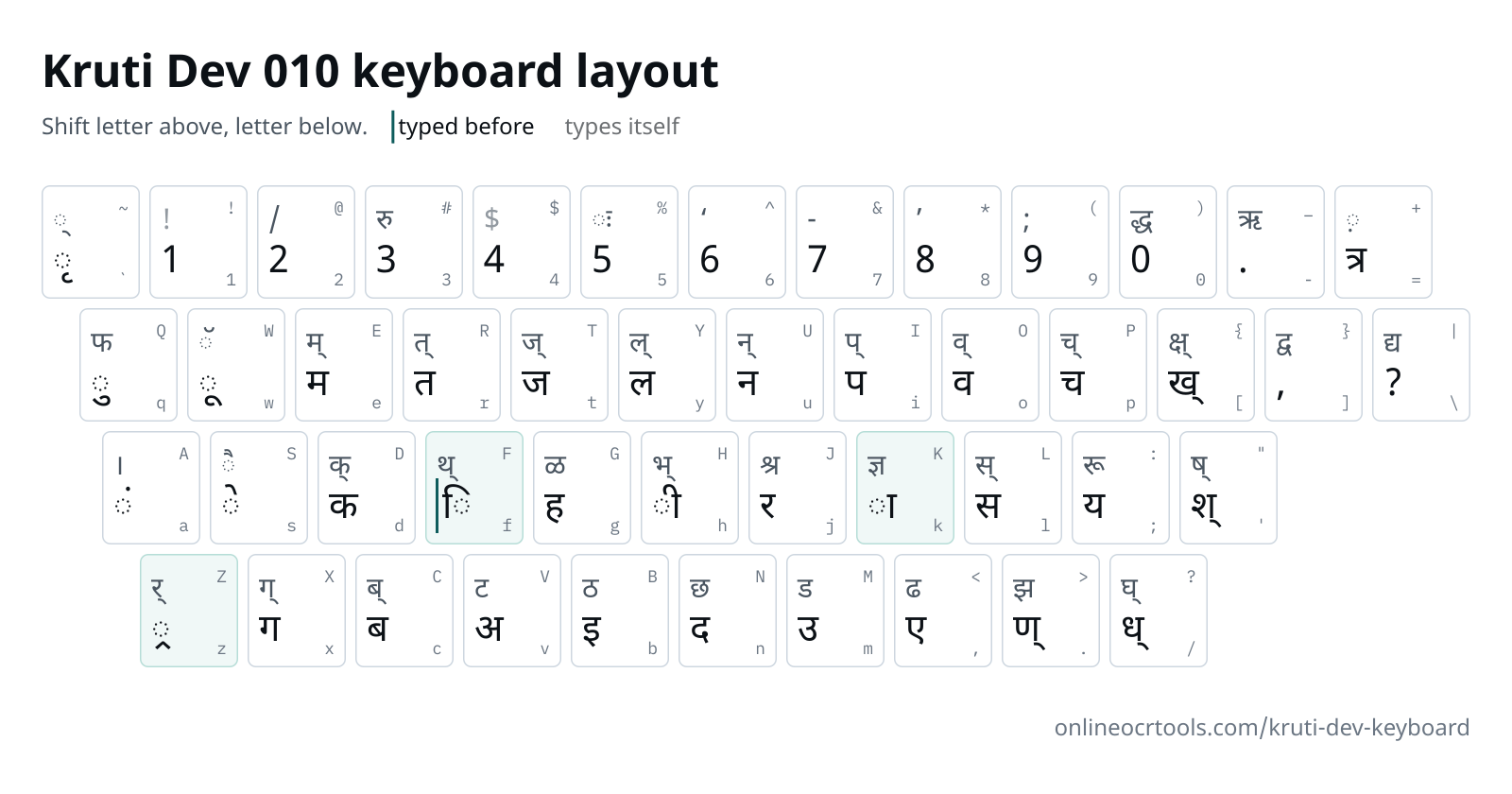
This Kruti Dev keyboard chart shows the letter under every key of Kruti Dev 010, with and without Shift. It follows the Remington typewriter layout. Press a key on the chart or on your own keyboard, and the practice box shows the Hindi it makes.
Also:Hindi Font Converter
Kruti Dev 010 keyboard
Each key shows its letter, and its Shift letter above it.
typed before the letter it sits ontypes itself (no letter on this key)
Practise on a computer keyboard. Phone keyboards don't have the Remington layout and change what you type.
Start typing on your keyboard, or click the keys. Each key lights up on the chart as you press it.
What we accept
What goes in and out
Text in
Paste or type
Kruti Dev 010 text
Text out
Copy
Unicode text
Where it runs
Conversion
In your browser
Your text
Not uploaded
Why people use this tool
For typing-test candidates learning Remington keys, and for typists who can't find a rare letter.
Both layers on one chart
Each key carries the letter you get with and without Shift, so you never flip between two pictures.
Keys typed out of order
Kruti Dev takes ि before its letter and र् after the syllable. Both keys are marked on the chart, each with a sample word.
Hindi as you type
Every key you press turns into Hindi straight away. Hit a wrong key and the wrong letter shows, just as it would in a test.
Stays in your browser
The conversion runs on your device. Your text is not uploaded to our server.
How to type in Kruti Dev 010
Four steps, all of them in your browser. Nothing to install and no account.
Find the letter.
Look for it on the chart, or in the key table further down if you use a screen reader.
Learn the three odd keys.
Press f before a letter for ि, Z after a syllable for र्, and k to complete half letters such as ध.
Try it in the box.
Type Kruti Dev keys into the practice box. The Hindi appears beside it, spelled the way a reader will see it.
Check the joined letters.
The tricky letters table lists the keys behind क्ष, त्र, ज्ञ and the other joined shapes.
What's kept, and what to check
The text comes across as it was typed. A few things are worth a look before you use it.
What's kept
What the practice box does
Every key.
Each key you press is read as Kruti Dev 010, even when the letters spell an English word.
Line breaks.
Press Enter to start a new line, as you would in a typing test passage.
Check before use
Before you rely on it
Your exam's layout.
An exam notice names the font and the keyboard layout. Hold a few of its keys up against this chart.
Phone keyboards.
They lack the Remington keys and rewrite what you type. Practise at a computer.
The chart draws each letter in a Unicode Hindi font. It shows what a key types in Kruti Dev 010 without using or supplying the Kruti Dev font.
Keys that work differently
- f◌ि
Short i comes first
Type
fbefore the letter, as on a typewriter.fdgives कि. - Zर्
Reph comes last
Type the whole syllable, then
Zfor the र् on top.dk;Zgives कार्य. - k◌ा
The aa stroke finishes half letters
kis ा after a letter. After a half letter it completes it:/is ध् and/kis ध.
Every key in Kruti Dev 010
The same chart as a table, one key per row.
| Key | Types | Shift + key | Types |
|---|---|---|---|
| ` | ◌ृ | ~ | ◌् |
| 1 | 1 | ! | !types itself |
| 2 | 2 | @ | / |
| 3 | 3 | # | रु |
| 4 | 4 | $ | $types itself |
| 5 | 5 | % | ◌ः |
| 6 | 6 | ^ | ‘ |
| 7 | 7 | & | - |
| 8 | 8 | * | ’ |
| 9 | 9 | ( | ; |
| 0 | 0 | ) | द्ध |
| - | . | _ | ऋ |
| = | त्र | + | ◌़ |
| q | ◌ु | Q | फ |
| w | ◌ू | W | ◌ॅ |
| e | म | E | म् |
| r | त | R | त् |
| t | ज | T | ज् |
| y | ल | Y | ल् |
| u | न | U | न् |
| i | प | I | प् |
| o | व | O | व् |
| p | च | P | च् |
| [ | ख् | { | क्ष् |
| ] | , | } | द्व |
| \ | ? | | | द्य |
| a | ◌ं | A | । |
| s | ◌े | S | ◌ै |
| d | क | D | क् |
| f | ◌िtyped before | F | थ् |
| g | ह | G | ळ |
| h | ◌ी | H | भ् |
| j | र | J | श्र |
| k | ◌ा | K | ज्ञ |
| l | स | L | स् |
| ; | य | : | रू |
| ' | श् | " | ष् |
| z | ◌्र | Z | र् |
| x | ग | X | ग् |
| c | ब | C | ब् |
| v | अ | V | ट |
| b | इ | B | ठ |
| n | द | N | छ |
| m | उ | M | ड |
| , | ए | < | ढ |
| . | ण् | > | झ |
| / | ध् | ? | घ् |
Tricky letters we test
The keys for the letters learners ask about most. Each row goes through the practice box's own converter when the site is built.
| Keys | Unicode | What makes it hard |
|---|---|---|
| Keys'kklu | Unicodeशासन | श lives on the apostrophe key ' as a half letter. Press k after it for the full श, so शासन starts with 'kk. |
| Keysfo"k; | Unicodeविषय | ष is the same key with Shift, ", and then k. Forget Shift and विषय comes out as विशय. |
| Keysf'k{kk | Unicodeशिक्षा | क्ष has a key of its own, { (Shift and the left bracket), finished with k. The f for the short i still goes in before half श. |
| Keysi= | Unicodeपत्र | त्र sits on the equals key =, so पत्र takes only two presses, i and then =. |
| KeysKkiu | Unicodeज्ञापन | ज्ञ is Shift and k, typed as K. The small k right after it adds the ा of ज्ञा. |
| Keys,s'o;kZ | Unicodeऐश्वर्या | ऐ takes two keys: , for ए and s for its second stroke. The reph of र्या waits until ;k is typed, then goes in as Z. |
| Keysfo|ky; | Unicodeविद्यालय | द्य is one key: Shift and backslash, the pipe |. Then ky; finishes विद्यालय. |
| Keysdk;ksZa | Unicodeकार्यों | कार्यों ends with two keys that both sit on य: the reph Z first, then the dot a. |
| KeysdhfrZ | Unicodeकीर्ति | In ति the short i key f goes before r, and the reph Z after it, which makes कीर्ति the keys dhfrZ. |
Questions
Answers to common questions about Kruti Dev Keyboard.
Why is the short i typed before the letter in Kruti Dev?
Kruti Dev copies the typewriter. On paper the ि stroke stands to the left of its letter, so the typist struck it first. For कि, press f and then d.
How do I type र् on top of a letter (reph)?
Finish the syllable the reph sits on, then press Shift and z for Z. For कार्य the keys are dk;Z, and र् lands over the य.
Is the Kruti Dev keyboard the same as Remington Gail?
Not quite. Kruti Dev 010 follows the Remington Hindi keyboard, and we compared it with Remington Gail key by key: 77 of the 94 key faces match, including every letter key and the short i key f. The other 17 sit on the number row and the symbol keys, where Remington Gail moves त्र, द्ध, द्य, ऋ, ः and । to new keys. Remington CBI is a separate layout again, so check which one your test names.
Do exams still use Kruti Dev?
It depends on the exam. Some ask for Kruti Dev 010 on Remington keys, and some want Unicode Hindi typed on InScript. Your notice names both the font and the layout, so practise the pair it gives.
How do I turn what I typed into Unicode?
The practice box already writes Unicode, so press Copy under it. For a whole letter or file typed in Kruti Dev, use the Kruti Dev to Unicode converter instead.
Can I practise on my phone?
You can look keys up in this Kruti Dev typing chart on a phone. To build speed, sit at a computer, because phone keyboards lack the Kruti Dev 010 keyboard and swap letters as you type.
Other tools in the set
Converters for other old fonts and the other direction. Each one runs in your browser.