Mangal Keyboard
This Mangal font keyboard chart has two tabs: Remington Gail, the old typewriter keys, and InScript, the Hindi keyboard layout built into Windows. Mangal is only the font, so the layout decides which key gives which letter. Pick a tab and press a key to see its Hindi in the practice box.
Also:Hindi Font Converter
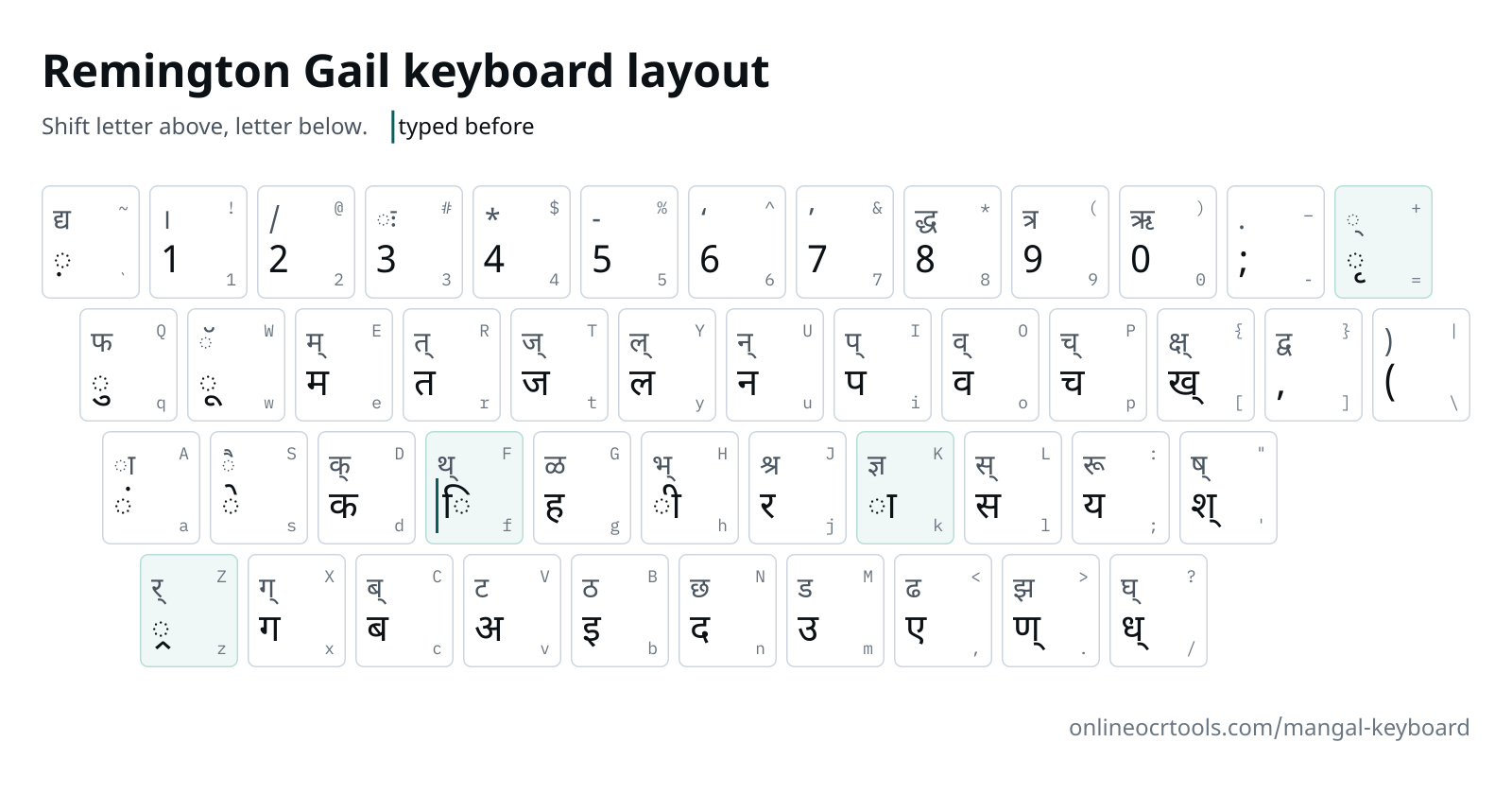
Remington Gail keyboard
Each key shows its letter, and its Shift letter above it.
typed before the letter it sits on
Practise Remington Gail at a computer. No phone keyboard has these keys, and autocorrect would change your Hindi.
Start typing on your keyboard, or click the keys. Each key lights up on the chart as you press it.
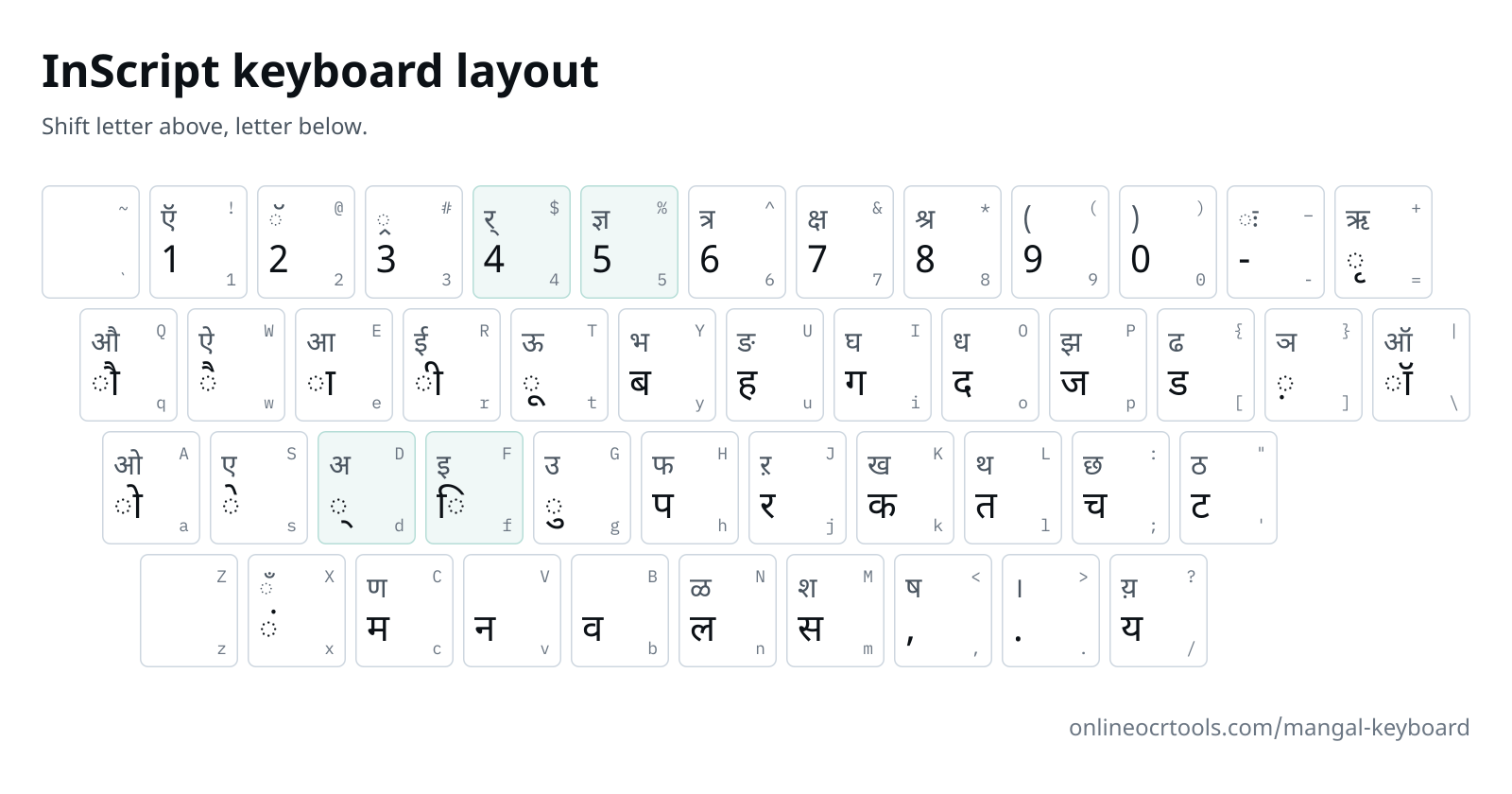
InScript keyboard
Each key shows its letter, and its Shift letter above it.
Practise InScript at a computer. Phone Hindi keyboards put letters in other places and change what you type.
Start typing on your keyboard, or click the keys. Each key lights up on the chart as you press it.
Download the Remington Gail chart (PNG)Download the InScript chart (PNG)
What we accept
What goes in and out
Text in
Paste or type
Remington Gail or InScript text
Text out
Copy
Unicode text
Where it runs
Conversion
In your browser
Your text
Not uploaded
Why people use this tool
For typing-test candidates whose notice asks for Mangal, and for office typists moving from Kruti Dev to Unicode.
Two layouts, one page
Remington Gail and InScript each have a chart and a practice box. Switch with the tabs, or send someone the InScript link.
Same word, different order
For कि, Remington Gail wants f and then d, the order a typewriter struck them. InScript wants k and then f, the order Unicode stores them in.
Slips show up as you type
Each key becomes Hindi the moment you press it. A stray d on the InScript tab leaves a half letter hanging, so you see the slip straight away.
Stays in your browser
The conversion runs on your device. Your text is not uploaded to our server.
How to practise Mangal typing
Four steps, all of them in your browser. Nothing to install and no account.
Pick your layout.
Your exam notice or office names it. Open the Remington Gail or InScript tab above the chart.
Find the letter.
Each tab's chart shows it. Both layouts also have a full key table lower down, which screen readers go through row by row.
Learn the keys that differ.
In Remington Gail, f goes in before a letter for ि. In InScript, ि comes after the letter, and d joins two letters into a conjunct.
Type a word.
Try हिन्दी: fgUnh on the Gail tab, ufvdor on the InScript tab. Each tab keeps its own text.
What's kept, and what to check
The text comes across as it was typed. A few things are worth a look before you use it.
What's kept
What each practice box does
Every key.
Keys are read in the layout of the open tab, so letters that look like English still come out as Hindi.
Line breaks.
Enter starts a new line in the Hindi as well, so a passage keeps its lines.
Check before use
Before you practise
Your exam's layout.
A notice that asks for Mangal should also name Remington Gail or InScript. The font on its own doesn't tell you which keys to learn.
Phone keyboards.
Hindi keyboards on phones follow neither layout and autocorrect words. Practise at a computer.
Mangal itself comes with Windows and isn't supplied here. The chart's letters use Noto Sans Devanagari, and Copy marks your Hindi to show in Mangal.
Keys that work differently
Remington Gail
- f◌ि
ि goes in first
Press
fand then the letter, in typewriter order.fdgives कि, andfgUnhgives हिन्दी. - Zर्
The reph key
This box takes
Zafter the syllable, the Kruti Dev way:/keZgives धर्म. Try one word in your exam's software to see if it wants the same order. - k◌ा
ा also completes half letters
Many Gail keys hold a half letter.
kor Shift andAafter one makes it whole:/is ध्, and both/kand/Agive ध. - +◌्
Halant on the plus key
+adds a halant to the letter before it, for a half form with no key of its own.d+gives क्.
InScript
- d◌्
Halant joins letters
Type a letter, then
d, then the next letter to join them.kd/gives क्य, andufvdorgives हिन्दी. - f◌ि
ि after its letter
InScript keeps reading order, so
ffollows the letter it belongs to:kfgives कि. - $र्
Two keys for र
Shift and
4is the reph, typed before the letter it sits on:ke$/gives कार्य. Shift and3puts ्र under a letter:k#gives क्र. - %ज्ञ
Conjuncts on the number row
Shift with
5,6,7or8types ज्ञ, त्र, क्ष or श्र in a single press.
Every key in Remington Gail
Each chart as a table, one key per row.
| Key | Types | Shift + key | Types |
|---|---|---|---|
| ` | ◌़ | ~ | द्य |
| 1 | 1 | ! | । |
| 2 | 2 | @ | / |
| 3 | 3 | # | ◌ः |
| 4 | 4 | $ | * |
| 5 | 5 | % | - |
| 6 | 6 | ^ | ‘ |
| 7 | 7 | & | ’ |
| 8 | 8 | * | द्ध |
| 9 | 9 | ( | त्र |
| 0 | 0 | ) | ऋ |
| - | ; | _ | . |
| = | ◌ृ | + | ◌् |
| q | ◌ु | Q | फ |
| w | ◌ू | W | ◌ॅ |
| e | म | E | म् |
| r | त | R | त् |
| t | ज | T | ज् |
| y | ल | Y | ल् |
| u | न | U | न् |
| i | प | I | प् |
| o | व | O | व् |
| p | च | P | च् |
| [ | ख् | { | क्ष् |
| ] | , | } | द्व |
| \ | ( | | | ) |
| a | ◌ं | A | ◌ा |
| s | ◌े | S | ◌ै |
| d | क | D | क् |
| f | ◌िtyped before | F | थ् |
| g | ह | G | ळ |
| h | ◌ी | H | भ् |
| j | र | J | श्र |
| k | ◌ा | K | ज्ञ |
| l | स | L | स् |
| ; | य | : | रू |
| ' | श् | " | ष् |
| z | ◌्र | Z | र् |
| x | ग | X | ग् |
| c | ब | C | ब् |
| v | अ | V | ट |
| b | इ | B | ठ |
| n | द | N | छ |
| m | उ | M | ड |
| , | ए | < | ढ |
| . | ण् | > | झ |
| / | ध् | ? | घ् |
Every key in InScript
| Key | Types | Shift + key | Types |
|---|---|---|---|
| ` | ~ | ||
| 1 | 1 | ! | ऍ |
| 2 | 2 | @ | ◌ॅ |
| 3 | 3 | # | ◌्र |
| 4 | 4 | $ | र् |
| 5 | 5 | % | ज्ञ |
| 6 | 6 | ^ | त्र |
| 7 | 7 | & | क्ष |
| 8 | 8 | * | श्र |
| 9 | 9 | ( | ( |
| 0 | 0 | ) | ) |
| - | - | _ | ◌ः |
| = | ◌ृ | + | ऋ |
| q | ◌ौ | Q | औ |
| w | ◌ै | W | ऐ |
| e | ◌ा | E | आ |
| r | ◌ी | R | ई |
| t | ◌ू | T | ऊ |
| y | ब | Y | भ |
| u | ह | U | ङ |
| i | ग | I | घ |
| o | द | O | ध |
| p | ज | P | झ |
| [ | ड | { | ढ |
| ] | ◌़ | } | ञ |
| \ | ◌ॉ | | | ऑ |
| a | ◌ो | A | ओ |
| s | ◌े | S | ए |
| d | ◌् | D | अ |
| f | ◌ि | F | इ |
| g | ◌ु | G | उ |
| h | प | H | फ |
| j | र | J | ऱ |
| k | क | K | ख |
| l | त | L | थ |
| ; | च | : | छ |
| ' | ट | " | ठ |
| z | Z | ||
| x | ◌ं | X | ◌ँ |
| c | म | C | ण |
| v | न | V | |
| b | व | B | |
| n | ल | N | ळ |
| m | स | M | श |
| , | , | < | ष |
| . | . | > | । |
| / | य | ? | य़ |
Tricky letters we test
Nine words with a conjunct or a reph, and their keys in both layouts. Every row is typed through each tab's keymap when the site is built.
| Remington Gail keys | InScript keys | Unicode | What makes it hard |
|---|---|---|---|
| Remington Gail keys'kklu | InScript keysMemv | Unicodeशासन | Remington Gail has only half श, on ', and the k after it makes it whole. InScript puts the full श on Shift and M, typed M. |
| Remington Gail keysfo"k; | InScript keysbf</ | Unicodeविषय | ष is Shift and the apostrophe in Remington Gail, " then k. InScript keeps it on Shift and comma, <, with no second key. |
| Remington Gail keysf'k{kk | InScript keysMf&e | Unicodeशिक्षा | Gail's short i key f goes in before half श, and क्ष is {k. InScript types क्ष in one press, Shift and 7, &, with ि after the श as Mf. |
| Remington Gail keysi( | InScript keysh^ | Unicodeपत्र | त्र moved in Remington Gail to Shift and 9, (, away from the Kruti Dev equals key. InScript has it on Shift and 6, ^. |
| Remington Gail keysKkiu | InScript keys%ehv | Unicodeज्ञापन | In Gail, ज्ञ is Shift and K, and a plain k after it adds the ा: Kk. InScript uses Shift and 5, then e for the ा: %e. |
| Remington Gail keysfo~ky; | InScript keysbfod/en/ | Unicodeविद्यालय | द्य is one Gail key, the tilde ~. InScript has no द्य key, so it is द, the halant and य: od/. |
| Remington Gail keys,s'o;kZ | InScript keysWMdbjd/e | Unicodeऐश्वर्या | Gail builds ऐ from ए and a stroke, ,s. InScript gives ऐ its own key, W, then needs two halants: Mdb for श्व and jd/ for र्य. |
| Remington Gail keysdk;ksZa | InScript keyskejd/ax | Unicodeकार्यों | कार्यों needs no reph key in InScript: र and the halant, jd, go in before य. The dot ं comes last, so यों is /ax. |
| Remington Gail keysdhfrZ | InScript keyskrjdlf | Unicodeकीर्ति | कीर्ति in InScript follows reading order: the reph as jd, then त and ि as lf, so र्ति is jdlf. |
Questions
Answers to common questions about Mangal Keyboard.
Is Mangal a font or a keyboard?
A font. Microsoft ships Mangal with Windows to display Unicode Hindi, and it has no keys of its own. What people call the Mangal Hindi keyboard is whichever layout types into it, usually Remington Gail or InScript.
Remington Gail or InScript: which should I learn?
The one your exam notice names. If your hands already know Kruti Dev, the Remington Gail keyboard layout keeps nearly all of those keys, since both follow the Remington typewriter layout. Starting from nothing, InScript needs no extra software on Windows.
How close is Remington Gail to Kruti Dev?
Very close. Both are a Remington Hindi keyboard: every lowercase letter key matches, and f still types the short i. Gail moves a handful of signs, mostly to Shift on the number row: त्र is Shift and 9, द्ध Shift and 8, and ऋ Shift and 0. The full stop । leaves Shift and A for Shift and 1, and Shift and A becomes a second ा. The Kruti Dev keyboard chart shows the old places.
How do I type half letters on the InScript Hindi keyboard?
Type the letter, then d for the halant, then the next letter: क्य is k, d and the slash key. ज्ञ, त्र, क्ष and श्र skip that step, with keys of their own on Shift and 5, 6, 7 and 8.
How do I turn these layouts on in Windows?
The InScript keyboard layout comes with Windows: add the Hindi Traditional keyboard in the language settings. Remington Gail needs separate typing software, so use the one your exam notice or office names.
Is a phone enough to learn Mangal typing?
On a phone you can still check where a letter sits on this Mangal font keyboard. Speed needs a real keyboard, because Hindi keyboards on phones follow neither Remington Gail nor InScript and correct words as you type.
Other tools in the set
Converters for other old fonts and the other direction. Each one runs in your browser.