PDF OCR
Run OCR on a scanned PDF or images and get a searchable PDF back. Your pages stay as they are, with the recognised English text added behind them.
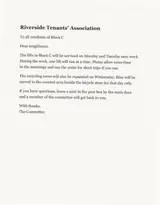
No image to hand? Sample: A typed notice, scanned and saved as JPG.
What we accept
LIMITS PER FORMAT
2 FORMATS
JPG / PNG
.jpgMax size
20 MB
Files per job
up to 20
Max size
20 MB
Pages
up to 20 per job
Files per job
1
Does your PDF need OCR?
Try selecting a sentence or pressing search in your PDF viewer. If nothing is found, the pages are probably pictures.
Scans and photos of pages
Many scanners and scanning apps store each page as a flat picture. OCR adds the words so the PDF becomes searchable.
Pages that already have text
A page with selectable text is left unchanged, and the result tells you which ones.
Only want the words?
For text to edit rather than a searchable PDF, try Scanned PDF to Text or PDF to Word.
What the searchable PDF contains
The same pages, plus text you can search and copy.
Your original pages
Page size, rotation and appearance are kept, and images are placed as pages at their own size. Scripts and launch actions inside your PDF are the one thing removed; links stay.
An invisible text layer
Each recognised line sits behind its place on the page. Selecting, copying and searching work on whole lines.
Only as good as the scan
Faint print, glare and small type can be misread, so the hidden text may hold mistakes. A search only finds the words as they were recognised.
English for now
Printed English is what this page reads. Handwriting and other languages are not available yet.
Why people use this tool
For scans you want to search and copy from without changing how they look.
Pages stay as they are
Your original pages are kept. The recognised words go in as a hidden layer, so the PDF looks the same but you can search and select.
PDF or images
Upload one PDF, or up to 20 JPG or PNG images, and get one PDF back with a page for each.
Check what it found
Read the preview of the recognised text before you download. Faint print and glare can cause errors, so check names and numbers.
Reads photos and scanned pages
Clear printed English gives the reader more to work with. Blur, shadows and tilted pages can cause missed or misread text.
Text grouped by page
Pages stay in order. Within a page, columns, lists and headings may need checking before you reuse the text.
Review before you download
Read the extracted text in the result panel, then copy it or download a TXT file. Compare it with your source when accuracy matters.
How to make a PDF searchable
Four steps, all of them in the browser. Nothing to install and no account — then convert to a searchable PDF.
Add your PDF or images
Choose one PDF, or up to 20 JPG or PNG images of up to 20 MB each. A PDF can have up to 20 pages.
Start the conversion
Each page is read with OCR. Processing time depends on the number of pages and how busy the server is.
Check the recognised text
Compare the preview with your pages, especially names, numbers and small print.
Download the searchable PDF
Press Download searchable PDF inside the hour, or open the arrow beside it for TXT or a Word file.
What the searchable PDF contains
Your pages, unchanged, with a hidden text layer behind them. Recognition depends on the scan, so check the words you search for.
In the PDF
What you can expect to open in a PDF viewer.
Your original pages
Page size, rotation and appearance stay as they were. Images become pages at their own size, and links stay.
Selectable, searchable text
The recognised words sit behind the page one line at a time, so you can select, copy and search.
Existing text untouched
Pages that already have selectable text are not changed.
Scripts removed
JavaScript and launch actions in the original PDF are dropped from the new file, and the result says when that happened.
Warnings
If processing reports something, it appears with the result so you know what to review.
Check before use
Limits of the hidden text.
Whole lines
Selection snaps to whole lines, so single words are not picked out as precisely as in a PDF made from a document.
Recognition mistakes
A word that was misread is not found when you search for its correct spelling.
About the text layer
The text layer sits behind the picture of each page. It is only as accurate as the OCR, and the page image itself is never altered. Scripts and launch actions in the original PDF are not carried into the new file.
Scanned pages are read with OCR, so check names, numbers and small print in the text before you rely on a search.
PDF OCR questions
Answers to common questions about PDF OCR.
What is a searchable PDF?
A PDF that looks exactly like your original pages but carries a hidden text layer, so you can select, copy and search the words in your PDF viewer.
Are my pages changed?
What you see on each page is not changed: your pages are kept as they were and the recognised text is added behind them. Images become pages at their own size. The one thing removed is hidden: JavaScript and launch actions in the original PDF are not carried into the new file, and the result tells you when that happened. Links, and the PDF's own title and author details, stay.
What files does it take?
One PDF of up to 20 MB and 20 pages, or up to 20 JPG or PNG images in a single conversion. Unlock password-protected PDFs first.
How precise is the text selection?
Selection follows whole lines. Select, copy and search all work, but single words cannot be picked out as precisely as in a PDF made from a document.
Do pages that already have text get changed?
Pages that already carry selectable text are left unchanged and the result says so. Only pages that need it get a new text layer.
Does it read other languages?
Printed English only. Handwriting and other languages are not yet supported here.
Can I get the plain text instead?
Yes. Open the download menu for TXT or a Word file, or use Scanned PDF to Text when the words are all you need.
How long is the PDF available?
For one hour after the conversion. Results are removed an hour after conversion and uploads an hour after their last conversion; cleanup runs every minute and can run late during an outage. Privacy lists the technical metadata kept longer.
Other tools in the set
Same reader, same price, same hour-long retention. Pick the one that matches what you need out the other end.