JPG to Text
Convert a JPG to text online. Drop a .jpg or .jpeg file, or a batch of up to 20, and get the text back to copy or download as TXT. PNG files work too.
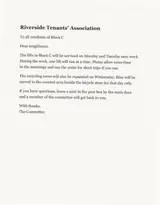
No image to hand? Sample: A typed notice, scanned and saved as JPG.
What we accept
LIMITS PER FORMAT
1 FORMAT
JPG / PNG
.jpgMax size
20 MB
Files per job
up to 20
JPG quality and text
JPG saves space by throwing detail away, and text is where that shows first.
Heavy compression
A JPG saved at low quality gets blocky halos around the letters. Where you can, export at high quality, or use the original file instead of a copy sent through a chat app.
Tiny text
Text only a few pixels tall does not carry enough detail to read reliably. Use the largest version of the image you have.
Resizing
Shrinking an image to send it by email makes small text harder to read, and enlarging it again afterwards does not bring the detail back.
Screen captures
Screen text is sharp, but JPG compression can blur thin strokes and coloured text. For screen captures, PNG usually keeps the letters cleaner.
Scanned pages
300 dpi is plenty for printed pages. If your scanner can save a PDF instead, PDF to Text takes the whole document as one file.
Why people use this tool
For when what you have is a JPG file and what you need is the words in it.
JPG or JPEG
Both spellings of the extension work, and so does PNG. There is no need to convert the file first.
Batches in order
Add up to 20 JPG files in one job. Each file's text comes back in the order you added it, with a blank line between files.
Large files welcome
Images up to 20 MB and 25 megapixels are accepted, so there is no need to shrink a big scan before you add it.
Reads photos and scanned pages
Clear printed English gives the reader more to work with. Blur, shadows and tilted pages can cause missed or misread text.
Text grouped by page
Pages stay in order. Within a page, columns, lists and headings may need checking before you reuse the text.
Review before you download
Read the extracted text in the result panel, then copy it or download a TXT file. Compare it with your source when accuracy matters.
How to convert JPG to text
Four steps, all of them in the browser. Nothing to install and no account — then convert to TXT.
Add your JPG files
Drop them in or choose them from your device: .jpg or .jpeg, up to 20 MB each and 50 MB per job.
Convert to TXT
Start the conversion. Several files are read in the order you added them.
Review the result
Check the text against each image, especially numbers, names and small print.
Copy or download
Copy the text, or save everything as one TXT file.
What the text result includes
The result is plain text grouped by page. Recognition and reading order depend on the source, so review it before use.
In the result
Plain text you can review, copy or download as TXT.
Page sequence
Pages appear in source order. For an image batch, the order of the images becomes the page order.
Text found
The result contains the words the service could read. Check names, numbers and missing words against your source.
Line breaks
Detected text blocks are separated by line breaks in TXT. Paragraph and heading structure can vary with the source.
Warnings
If processing reports a page warning, it appears with the result so you know what to review.
Check before use
Check the source before relying on the result.
Reading order
Columns, lists, headers and footnotes can be read out of order, especially on complex pages.
Layout and images
TXT does not retain fonts, pictures, tables or exact placement. Reformat the text if you need those details.
About plain text
Plain text stores characters and line breaks, not the layout of the original page.
Scanned pages are read with OCR, so proofread names, numbers and small print before you rely on the text.
JPG to text questions
Answers to common questions about JPG to Text.
Is there a difference between .jpg and .jpeg?
No. They are two spellings of the same format, and both are accepted. PNG files work here too.
Can I convert 20 JPG files at once?
Yes. Add up to 20 images, each up to 20 MB, with 50 MB in total per job. The text comes back grouped by image, in the order you added them.
What do I get back?
Plain text. Copy it, or download one TXT file for the whole batch. Fonts, pictures and the exact placement on the page are not kept. To keep the pictures themselves in one file, use JPG to PDF instead.
Does a low-quality JPG work?
Often, but heavy compression smears the edges of letters. If the text looks blocky or fuzzy when you zoom in, find a larger or less compressed copy of the image before you convert it.
Other tools in the set
Same reader, same price, same hour-long retention. Pick the one that matches what you need out the other end.
Image to Text
Pull text out of any photo or scan
Photo to Text
Turn a phone photo of a page, notice or receipt into text you can copy or save as TXT. Take the photo right in the browser. Free, no sign-up.
Copy Text from Image
Paste or drop an image and copy the text out of it. Works with screenshots, chat pictures and photos. Free, no sign-up, ready to paste.