PNG to Text
Convert PNG to text online. Drop an exported slide, a diagram or a screen capture saved as .png, and get the words back to copy or download as TXT. JPG files work too.
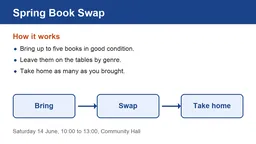
No image to hand? Sample: An exported slide saved as PNG.
What we accept
LIMITS PER FORMAT
1 FORMAT
PNG / JPG
.pngMax size
20 MB
Files per job
up to 20
Transparent and graphic PNGs
PNG is the usual format for slides, logos and diagrams, and those images bring their own quirks.
Text on transparency
Transparency is removed before reading, and in many PNGs the see-through area turns black. Dark text then disappears into it. Export with a white background, or flatten the image in your editor first.
Diagram labels
Labels in boxes and next to arrows come back as separate lines. The shapes and arrows themselves are not described, so keep the image open to see which label went where.
Coloured and white text
Text in colour, or white lettering on a coloured band, is read when it stands out clearly from what is behind it. Pale text on a pale background is the case to avoid.
Icons and logos
Icons carry no words and are skipped, though a round bullet can come back as a dot character. Letters drawn as part of a logo may or may not be picked up.
Screen captures
Most screenshots are saved as PNG. For capture shortcuts on each device and pasting from the clipboard, use the screenshot to text converter.
Why people use this tool
For images that were made on a computer rather than photographed.
PNG first
Choose or drop .png files straight from your export folder. JPG files can go in the same batch.
Headings and labels
Coloured headings, labels inside boxes and captions under a chart come back as lines of plain text.
A deck, slide by slide
Exported a presentation as images? Add up to 20 PNG slides and the text returns slide by slide, in the order you added them.
Reads photos and scanned pages
Clear printed English gives the reader more to work with. Blur, shadows and tilted pages can cause missed or misread text.
Text grouped by page
Pages stay in order. Within a page, columns, lists and headings may need checking before you reuse the text.
Review before you download
Read the extracted text in the result panel, then copy it or download a TXT file. Compare it with your source when accuracy matters.
How to convert PNG to text
Four steps, all of them in the browser. Nothing to install and no account — then convert to TXT.
Add your PNG files
Drop the .png files in or pick them from a folder. Each can be up to 20 MB, with 50 MB in one job.
Fix see-through images
If an image has a transparent background and dark lettering, export it again with a white background first.
Start reading
Press Convert to TXT and wait for each file to finish.
Take the text
Copy it into your notes or slides, or download one TXT file for the whole set.
What the text result includes
The result is plain text grouped by page. Recognition and reading order depend on the source, so review it before use.
In the result
Plain text you can review, copy or download as TXT.
Page sequence
Pages appear in source order. For an image batch, the order of the images becomes the page order.
Text found
The result contains the words the service could read. Check names, numbers and missing words against your source.
Line breaks
Detected text blocks are separated by line breaks in TXT. Paragraph and heading structure can vary with the source.
Warnings
If processing reports a page warning, it appears with the result so you know what to review.
Check before use
Check the source before relying on the result.
Reading order
Columns, lists, headers and footnotes can be read out of order, especially on complex pages.
Layout and images
TXT does not retain fonts, pictures, tables or exact placement. Reformat the text if you need those details.
About plain text
Plain text stores characters and line breaks, not the layout of the original page.
Scanned pages are read with OCR, so proofread names, numbers and small print before you rely on the text.
PNG to text questions
Answers to common questions about PNG to Text.
Can it read text on a transparent background?
Light lettering usually, dark lettering often not. Transparency is dropped before reading and the see-through area often turns black, so black text disappears into it. Export the image with a white background (most editors call this flattening) and add it again.
Does it read the labels in a diagram?
Yes. Labels in boxes, next to arrows and under a chart come back as separate lines, working down the image from the top. The shapes and arrows are not described, so check which label belongs to which box.
Does coloured text work?
Usually, when it stands out from its background: the sample on this page has an orange heading, blue labels and white lettering on a blue band. Low contrast is what causes misses, such as pale grey on white.
Is PNG better than JPG for text?
For screen text and graphics, usually yes. PNG keeps letter edges sharp, while JPG compression can soften them. Both formats are accepted here, up to 20 MB per file.
Other tools in the set
Same reader, same price, same hour-long retention. Pick the one that matches what you need out the other end.
Image to Text
Pull text out of any photo or scan
JPG to Text
Convert JPG and JPEG images to text online. Add up to 20 files, review the text, then copy it or download a TXT file. Free, no sign-up.
Screenshot to Text
Paste a screenshot and copy the text out of it. Grab words from videos, apps and pages that will not let you select them. Free, no sign-up.